
The inputs on screen
The game displays a persistent vertical list of 11 bike actions on the right side of the screen. In recorded footage, the narrator confirms only the Space key for performing a wheelie. The remaining actions are visible as menu labels, but their specific PC keybindings were not captured in recorded footage.
| Action | PC input | What to watch on screen |
|---|---|---|
WHEELE |
Space (confirmed by narration) | Balance meter with a green target band |
GET OFF |
Not captured in recorded footage | Visible on screen action menu; keybind not recorded |
TUCK |
Not captured in recorded footage | Visible on screen action menu; keybind not recorded |
BIKE MODE |
Not captured in recorded footage | Toggles driving and racing modes per narration; keybind not recorded |
GEARS |
Not captured in recorded footage | HUD shows GEAR number and RPM counter; keybind not recorded |
NEUTRAL |
Not captured in recorded footage | Visible on screen action menu; keybind not recorded |
CAMERA |
Not captured in recorded footage | Changes camera view; lobby displays CAMERA: CHASE |
LIGHTS |
Not captured in recorded footage | Visible on screen action menu; keybind not recorded |
FLASH |
Not captured in recorded footage | Visible on screen action menu; keybind not recorded |
ENGINE |
Not captured in recorded footage | Visible on screen action menu; keybind not recorded |
HORN |
Not captured in recorded footage | Visible on screen action menu; keybind not recorded |
Note that the HUD spells the wheelie action as WHEELE. Do not guess unlisted keybinds; treat unconfirmed inputs as missing evidence.
Step 1: Start a short wheelie
- Accelerate straight along an open highway lane to build forward momentum.
- Press Space to pull the front wheel off the pavement.
- Watch the balance meter on your HUD. Modulate your input so the indicator stays inside the green band.
- Let the front wheel settle back onto the road before approaching turns or traffic clusters.
How you know it worked: The balance indicator stays within the green zone for the duration of the lift, and the HUD registers an active WHEELIE readout.
Failure feedback: The exact error prompt or penalty message displayed when a wheelie drops prematurely was not recorded in footage.
Step 2: Claim the free trick and put it in a slot
- Open the bottom navigation bar and select
TRICKS. - Locate the first card,
One-Hander. The panel lists its cost asFREE, its multiplier tag asx1.0 PTS, its category asWHEELIE, and its description asLeft hand off the bars on a wheelie. - Click the
GET FREEbutton on the card to claim it. - Open the slot bar showing
SLOT 1–9and assign One-Hander to an open slot.
How you know it worked: The card badge changes from GET FREE to OWNED · SLOT 1.
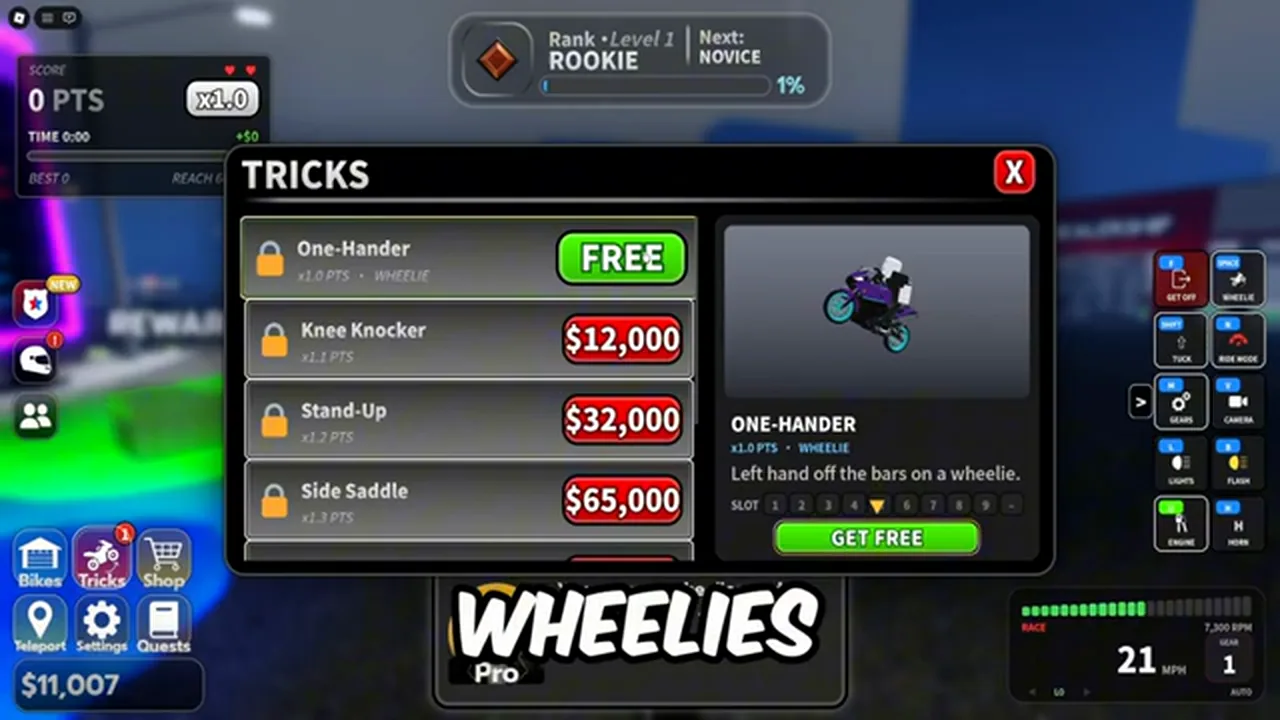
The tricks list: One-Hander is marked FREE with x1.0 PTS, and the paid wheelie tricks below it carry higher point multipliers.
Paid tricks and what the labels mean
Higher trick tiers unlock through cash purchases in the same TRICKS menu. Each trick carries a point multiplier tag and belongs to the WHEELIE category.
| Trick | Price | Multiplier label | Category | Description |
|---|---|---|---|---|
| One-Hander | FREE | x1.0 PTS |
WHEELIE | Left hand off the bars on a wheelie. |
| Knee Knocker | $12,000 | x1.1 PTS |
WHEELIE | Not read in recorded footage |
| Stand-Up | $32,000 | x1.2 PTS |
WHEELIE | Not read in recorded footage |
| Side Saddle | $65,000 | x1.3 PTS |
WHEELIE | Not read in recorded footage |
A fifth trick slot exists in the menu, but its name was cut off by the UI panel in recorded footage.
The x1.1 PTS label is strictly a score multiplier tag, not a direct cash multiplier. We did not verify which specific score components this multiplier affects, and you should not calculate it as extra wallet payout.
Use these rules to decide whether to buy paid tricks:
- If you only have starter cash ($11,000 from codes): Do not spend your wallet balance here. Equip the free One-Hander and preserve your cash for dealership vehicles like the Corvara RV 660 ($12,500).
- If you have accumulated $12,000 to $32,000: Purchase Knee Knocker only if you want to test score milestone gains. If your goal is reaching higher top speeds, dealership bike purchases take priority.
- If you have over $65,000: Higher tiers like Stand-Up and Side Saddle increase the point multiplier tag on screen, but do not purchase them expecting a guaranteed proportional cash return.
When a wheelie keeps dropping
If your bike repeatedly drops out of a wheelie, verify these three physical conditions:
- Check lane clearance: Clipping traffic hitboxes or roadside barriers immediately interrupts the stunt and returns the bike to two wheels or triggers a crash.
- Check pitch angle: Pulling the front wheel up too aggressively moves the balance indicator past the green zone, dropping the front end back down.
- Check forward speed: Attempting to initiate or sustain a wheelie at near-zero velocity stalls the lift. Build steady rolling speed first.
We did not record any emergency recovery keybind or mid-air balance correction shortcut in recorded footage. Do not press unverified combinations when the front end drops.
Death wobble
The official Night Rider game description specifically warns riders to watch out for death wobbles while weaving through high-speed highway traffic.
Unverified Mechanic: Recorded gameplay footage contains no captured visual of a death wobble occurring and no recorded player input sequence to recover from one. We do not provide an unverified handling trick or stabilization fix for this condition because the exact trigger and counter-action were not captured on camera.
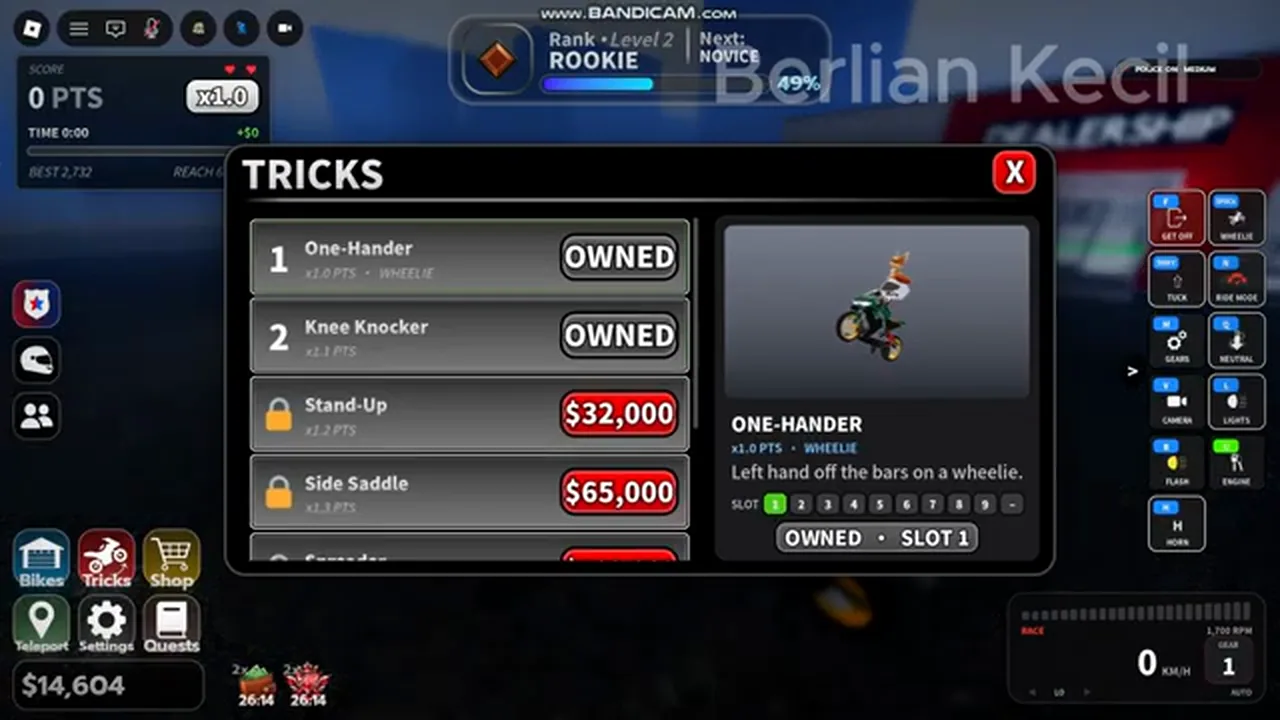
After claiming, the panel switches to OWNED · SLOT 1. That is the state to look for before trying to trigger it.
Speed units
Recorded gameplay footage displays speed readings in MPH in one recording and KM/H in another, confirming that the game supports unit switching.
The exact menu button or setting toggle to change between MPH and KM/H was not captured in recorded footage. Check the interface settings panel in your client to locate the switch.
Next steps
Once you can hold a steady wheelie, read how the score turns into cash to see when running points convert into bankable rewards. If you plan to run with police alerts enabled, practice holding speed during a chase without dropping out of high gear.